There is a specific kind of conversation we have often. A business owner shows us their site on a laptop in an air-conditioned office on fibre broadband. It is instant. They cannot understand why anyone would call it slow.
Then we open the same site on a three-year-old Android phone, on mobile data, standing outside. It takes eleven seconds. That second experience is the one your customers are having, and — crucially — it is the one Google is measuring.
Google measures real visitors, not your laptop
This is the part that surprises people. Google's page experience signals are based substantially on field data — anonymised measurements from actual Chrome users visiting your site, gathered in the Chrome User Experience Report. Not a simulation. Real phones, on real networks, in real places.
In India that skews heavily towards mid-range Android devices on mobile data of wildly variable quality. If your audience is in Udupi, Kundapura or Sirsi rather than a metro business district, your field data reflects that, whatever your laptop says.
Which is why the first useful thing to do is stop trusting your own impression. Open Search Console, find the Core Web Vitals report, and look at what your actual visitors experienced.
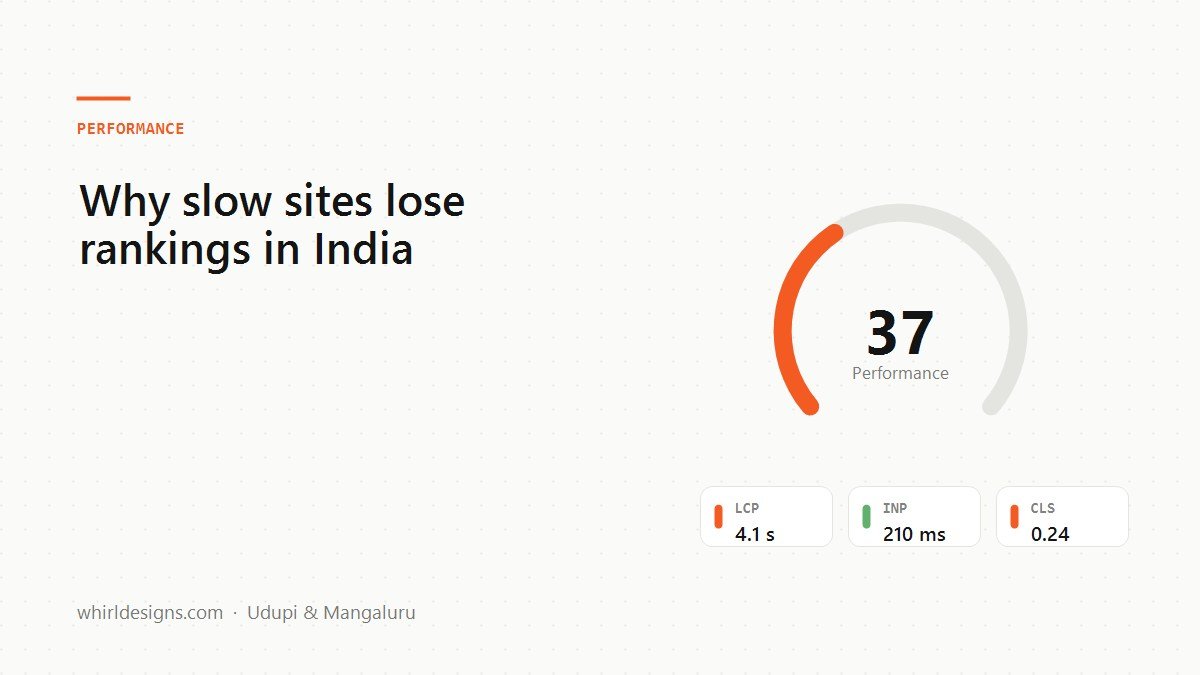
The three numbers, in plain terms
LCP — Largest Contentful Paint
How long until the biggest thing on screen — usually the hero image or headline — has actually appeared. Good is under 2.5 seconds. This is the one most Indian sites fail, and the cause is almost always the same: an enormous hero image, uncompressed, at desktop dimensions, being downloaded over a mobile connection.
INP — Interaction to Next Paint
You tap something. How long before the screen responds. Good is under 200 milliseconds. This replaced the old First Input Delay metric because FID measured only the first tap and was flattering to the point of uselessness. INP is harsher and more honest. Heavy JavaScript is the usual culprit — every chat widget, popup, tracker and animation library competes for the same single thread on a phone that is already struggling.
CLS — Cumulative Layout Shift
How much the page jumps around while loading. Good is under 0.1. This is the one that makes people tap the wrong thing — the button moves down as a banner loads in above it. It is also, mercifully, the easiest to fix.
The fixes that actually move the numbers
In rough order of return per hour spent:
1. Fix your images
This one change fixes most failing LCP scores on its own. Three parts to it:
- Resize before uploading. A 4,000-pixel-wide photo from a phone camera displayed in a 800-pixel slot is roughly twenty times more data than needed.
- Serve WebP. Typically 25–35% smaller than JPEG at the same visible quality, supported by every browser that matters now.
- Set width and height on every image. This costs nothing and fixes most CLS, because the browser reserves the right amount of space before the image arrives.
2. Remove what you are not using
Count the third-party scripts on your site. Analytics, a heat-mapping tool nobody has opened in a year, two chat widgets from two experiments, a font library used for three icons, a slider plugin on a page with one slide. Each one is a download and then work for a phone processor that has none to spare.
3. Load fonts sensibly
Custom fonts are worth having, but a page waiting on a font file shows nothing at all. Use font-display: swap so text appears immediately in a fallback and reflows when the real font lands. Preconnect to the font host. Ship two weights, not six.
4. Do not let the popup be the largest paint
A newsletter modal that appears immediately, covering the screen, can become the largest contentful paint — which means Google is timing your popup rather than your page. Delay it, or trigger it on scroll.
5. Host somewhere near your customers
A shared server in the United States adds a real round trip to every request from Karnataka. For an Indian audience, hosting in an Indian or Singapore region, or putting a CDN in front, is one of the cheapest wins available.
What good actually looks like
Perfection is not the goal, and chasing a green 100 in PageSpeed Insights is usually a waste of a day. The goal is passing the thresholds for real users: LCP under 2.5s, INP under 200ms, CLS under 0.1, for 75% of visits.
A useful sanity check that costs nothing: put the site on a mid-range Android phone, throttle it to 4G, and use it standing outside. If that feels acceptable, you are fine. If it does not, no score will save you.
Does speed actually affect rankings?
Honestly: less than people selling performance work imply. Page experience is a real but modest signal, and a fast page about nothing will not outrank a slow page that answers the question properly. Content and relevance still dominate.
Where speed decides things is between pages of similar quality — which, in a local market with a handful of competitors, is exactly the situation you are usually in. And it decides something more immediate than ranking: whether the person who arrived actually waited long enough to read you. Every second of delay costs conversions, and that cost applies whether or not Google ever notices.
Common questions
What are Core Web Vitals?
Three measurements of real user experience: LCP, how long until the largest element appears, good under 2.5 seconds; INP, how quickly the page responds to a tap, good under 200 milliseconds; and CLS, how much the layout jumps while loading, good under 0.1.
Why does my site feel fast to me but score badly?
Because Google measures real visitors, not your laptop. Its field data comes from actual Chrome users, which in India means mid-range Android phones on variable mobile data. Your office broadband experience is not the one being scored.
What is the fastest way to improve page speed?
Fix the images. Resize before uploading, serve WebP, and set width and height on every image tag. That one change fixes most failing LCP scores and most layout shift at the same time, and costs nothing but an afternoon.