A ready-made school app
Best for: A simple dues structure and standard grading
- Many schools already run on the same screens
- Can be running within weeks, often with a parent app
- Your office adjusts its dues and marks work to fit the product

School management software · Udupi & Mangaluru
We build school and college software around your own rules: admissions, attendance, dues, instalments and concessions, marks, report cards and parent notices. The team that builds it in our Udupi studio looks after it every academic year.
In short
School management software is one system that runs a school's office work, from admissions, attendance and collecting dues to marks, report cards and notices to parents, so staff stop copying the same details between registers and spreadsheets. Whirl Designs, a studio in Udupi in coastal Karnataka, builds it around each institution's own instalments, concessions and grading rules, and plans the switch-over between academic years.
Start here
Plenty of schools are well served by a product that already exists. Here are the three routes, simplest first.
Best for: A simple dues structure and standard grading
Best for: Software that works apart from one or two gaps
Best for: Several institutions, or rules no product fits
Already comparing school apps? Bring the shortlist to the first meeting, and we will say plainly whether one of them fits.
Our work
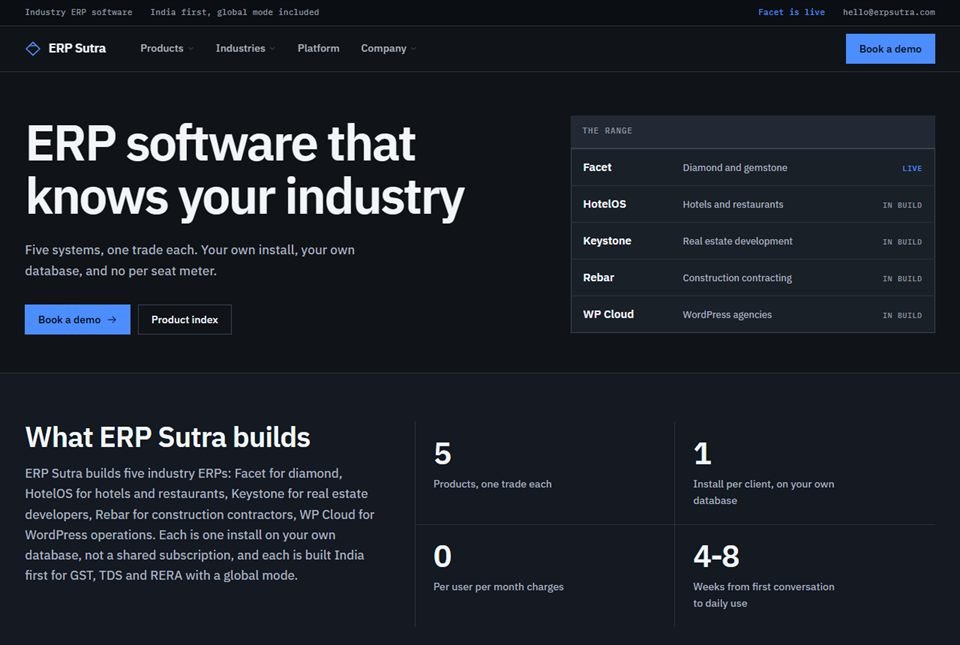
We have not built a school or college system yet, and we would rather say so plainly. What we have built is the layer a school system stands on. ERP Sutra, our own product arm, has one shared platform for logins, roles, an audit trail (a log of who changed what) and backups, with industry ERPs on top that are live with paying users. A school needs exactly that: a teacher, a clerk and a principal each seeing different things, and proof of who changed a mark or a receipt.
Rebar, one of those ERPs, handles weekly labour runs and the PF, ESI and Form 24Q (TDS on salaries) returns that follow them, with income-tax slabs stored as data rather than fixed in the code. A school's staff salaries need the same kind of work. For Jayalaxmi Jewellers we built savings schemes and WhatsApp reminders sent from approved templates, which behave much like term instalments and dues reminders.
Closest projects
 ERP Sutra
Software products · Karnataka
Our own product arm — a shared platform layer with two industry ERPs built on top of it, both live with paying users rather than sitting in a pitch deck.
Rebar — Construction ERP
Construction ERP · Private system
Site-to-payroll software for reinforcement-steel contractors: bar bending schedules, sub-contractor bills, weekly labour runs and the statutory returns that follow them.
ERP Sutra
Software products · Karnataka
Our own product arm — a shared platform layer with two industry ERPs built on top of it, both live with paying users rather than sitting in a pitch deck.
Rebar — Construction ERP
Construction ERP · Private system
Site-to-payroll software for reinforcement-steel contractors: bar bending schedules, sub-contractor bills, weekly labour runs and the statutory returns that follow them.
 Jayalaxmi Jewellers
Retail jewellery · Karkala
A brand site for a gold house trading since 1990, built to feel like the shop it represents — and backed by a full retail ERP handling billing, savings schemes and old-gold exchange.
Jayalaxmi Jewellers
Retail jewellery · Karkala
A brand site for a gold house trading since 1990, built to feel like the shop it represents — and backed by a full retail ERP handling billing, savings schemes and old-gold exchange.
What you get
Which modules you need changes from one institution to the next. These six are in every plan we write for a school.
How it runs
The switch is planned around your academic calendar, not around our schedule.
We spend a day with the office staff, a few teachers and the principal, and collect the registers, receipt books and report card formats in use today.
The plan lists each module, who sees what, every kind of dues and every report, with a date against each part. Admissions and collecting dues usually come first, so they are working when the new year opens.
Student lists, opening dues and past marks move in from your spreadsheets or old software. The office checks the totals for each class before anything goes live.
A few teachers and the office use it for a couple of weeks next to the old registers, so any mistake turns up while only one class is affected.
Teachers and office staff are trained in short sessions at your school. Then everyone moves across between terms, never during exams or the admissions rush, and parents get a notice explaining how to log in.
Promotions to the next class, a new concession or a change in the board's grading rules are handled by the people who built the system.
Not a fit
Better to hear it at the first meeting than in the middle of a term.
Questions
Most schools need admissions and student records, attendance, collecting dues with receipts, timetables, marks and report cards, and notices to parents. Many also need transport, hostel, library or staff salaries. We build the modules your institution will use in its first year and add the rest later, so staff are not trained on screens nobody opens.
A first part, usually admissions and dues collection, takes about six to ten weeks to build and test. A fuller system with attendance, marks, report cards and a parent app is more like three to six months. We plan backwards from the date your next academic year or term begins, so the switch-over lands on a break.
Yes. Parents see attendance, dues, receipts, report cards and notices on their phone, in the browser or as an app on the home screen, and can pay online through a payment gateway set up in the institution's own name. Teachers get their own login to mark attendance and enter marks. We test on the ordinary Android phones and slow mobile data most parents have.
Yes, and this is often where a custom system makes sense. Each institution, whether a school, PU college, degree college or hostel, keeps its own classes, dues and grading, while the trust office sees totals across all of them, and school buses can be shared. A parent with children in two institutions gets one login, and roles decide which staff see which institution's records.
Yes. Each student's SATS number (Karnataka's student ID), PEN from UDISE+ and APAAR ID can be stored with their record and listed in the order the office needs when entering data on those portals. How much can be uploaded straight into a government portal depends on what that portal allows at the time, so we check it with your office before promising anything.
The institution does. Its code, student database and hosting account are all registered in its name, and you can export everything at any time. Most students are children under India's DPDP Act, the data protection law, so the system keeps only what the school needs, limits who sees what by role, records a parent's consent where the law asks for it, and has backups tested by restoring them.
Not always. If it handles the core well, we can build only what it lacks, such as transport routes or a trust-level report, and link the two, as long as your software can share its data through a file export or a direct link (an API). If a full replacement makes more sense, the records move across between academic years, not in the middle of one.
Yes to both. Office screens, receipts, report cards and parent notices work in Kannada, in English, or in both side by side, and Kannada names are checked to print correctly on certificates. From our studio in Udupi, we visit campuses in Manipal, Mangaluru, Karkala, Kundapura and Udupi itself, and go through each step with the principal and office staff in person, so they know the people building their system.
Worth reading first
Clean, documented, tested code on a modern, proven stack — the foundation that keeps your school & institution management systems fast and dependable for years.
Ready when you are
Walk us through one term at your institution, from admissions to report cards, and you will get a clear plan in writing that names the first part to build and the term break it can start in.