
WhatsApp Business API integration · Udupi & Mangaluru

Your system sends the WhatsApp, not your staff

We connect the WhatsApp Business API to your billing, order or booking software, so receipts, updates and reminders go out on their own and replies reach your team. Meet us at our Udupi studio; we stay on once the messages start.

Demo screen with made-up data.
In your name
the WhatsApp account and number stay yours
Sent by your system
from bills, orders and dues, not by hand
Templates handled
written with you and submitted to Meta
Every send logged
delivered, read or failed, with the reason

In short

What is WhatsApp Business API integration?

WhatsApp Business API integration connects your own software to WhatsApp so it sends messages by itself: a receipt when a bill is saved, an update when an order ships, a reminder before a payment falls due. Messages the business starts must use templates approved by Meta, which runs WhatsApp. Whirl Designs, based in Udupi in coastal Karnataka, adds WhatsApp messaging to billing, order and booking systems.

Updated · Whirl Designs, Udupi

Start here

The app, a ready platform, or your own system?

WhatsApp can serve a business in three ways, and the API is only one of them. Plenty of shops are well served by the first two, so our first conversation with you is about which one fits.

The WhatsApp Business app

Best for: One phone and a few dozen chats a day

  • Set up on a phone in minutes, with a catalogue, labels and quick replies
  • Apart from greeting and away messages, a person sends every reply
  • Your billing or booking software cannot send anything through it
A ready messaging platform

Best for: Broadcasts and a shared inbox, with nothing to build

  • A provider's dashboard for approved templates and team chats
  • Plug-ins for popular online stores and CRMs
  • It cannot see your own bills, stock or dues

Built into your own system

Best for: Messages that depend on your own bills, orders and dues

  • A receipt or update goes out the moment the bill or order is saved
  • Filled in from your customer records, in Kannada or English
  • Replies and delivery status saved against the customer

If the app or a ready platform is enough for you, you will hear that from us first, along with help setting it up.

Our work

A jeweller's ERP that sends its own WhatsApp receipts

Jayalaxmi Jewellers
Retail jewellery · Karkala

Read the full case study →
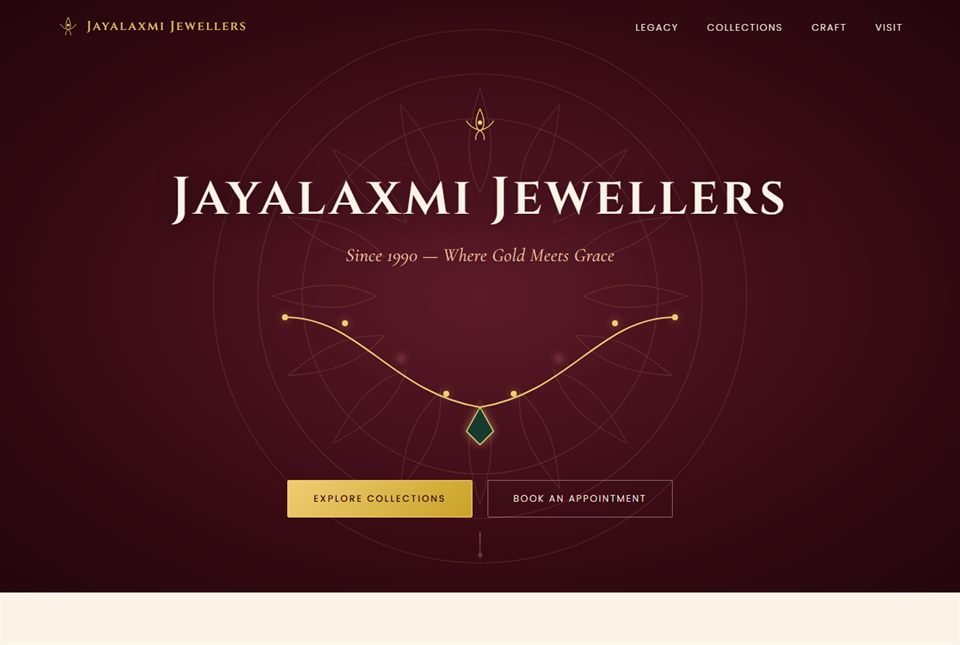
Jayalaxmi Jewellers — screenshot of the live site
Live site: jayalaxmijewellers.in

Jayalaxmi Jewellers, in Karkala, has been trading in gold since 1990. We built two things for it: a brand website with collections and appointment booking, and a separate retail ERP that handles POS billing, savings schemes, old-gold exchange and stock.

The shop's WhatsApp messages come from inside that ERP. Customers receive their receipts and reminders on WhatsApp, sent from the system through the WhatsApp Business API, and each message is built on a template that was approved in advance.

  • WhatsApp receipts and reminders sent from the ERP, not from a phone
  • Each message built on an approved message template
  • One system for POS billing, savings schemes, old-gold exchange and stock
  • Built in PHP and MariaDB, with the WhatsApp Business API connected in

What you get

Six things every WhatsApp integration includes

The plan names each one for your business: which account, which messages, which events send them, and who answers.

  1. The business accountA WhatsApp Business account under your own Meta business account, verified, with the display name, logo and profile your customers will see at the top of every chat.
  2. Templates, written and filedEvery message your business starts, written as a template with blanks your system fills in, in English, Kannada or both. Each is filed under the right category: a receipt is a utility message, an offer is marketing, and Meta treats the two differently.
  3. The triggersThe exact event behind each message: a bill saved, an order dispatched, a payment due in three days. Each one is set in your software once, so a message never waits for someone to remember it.
  4. Consent and opt-outA record of which customers agreed to get messages from you, and an easy way to stop. When a customer replies STOP, your system marks it and stops messaging them.
  5. Replies that reach a personWhen a customer writes back, the chat reaches the right person in your team, with the bill or order beside it. Simple, common questions can get an automatic answer first.
  6. A log of every messageSent, delivered, read or failed, saved with the reason for any failure. Messages that fail for a passing reason are tried again, and when a customer says one never arrived, you can check.

How it runs

From the first call to the first message

You see every message on your own phone before a customer gets one.

  1. List the messages

    Together we list each message a customer should get: what triggers it, what it says, and who handles the reply. Three or four messages are usually enough to start.

  2. Accounts and verification

    Your Meta business account is set up and verified with your business documents, such as your GST certificate, and the phone number is registered. Verification can take a few days, so it starts first.

  3. Templates submitted

    Each template is written with you, in the language your customers read, and sent to Meta. Its rules are followed from the first draft: no blank at the very start or end, no two blanks side by side. Any that still come back rejected are reworded and sent again.

  4. Connected and tested

    Your software is connected, and messages go to your own staff's phones first, from test bills and orders. The wording, the timing and every filled-in detail get checked.

  5. Live, one message at a time

    The most useful message, usually the receipt, goes live first. We watch the delivery log for the first weeks, add the rest, and stay on as Meta changes its rules.

Not a fit

When you should skip the API

Sometimes the honest advice is a simpler tool, or no build at all.

  • You send a handful of messages a day and are happy typing them. The WhatsApp Business app does that well, and we can help you set up its catalogue and quick replies.
  • You mostly want to send offers to your whole list. A ready broadcast platform does that without building anything, and we will point you to one.
  • You want to message numbers from a bought list, or people who never agreed to hear from you. We will not build that: it breaks WhatsApp's rules and puts your number at risk of being restricted.
  • You need it live tomorrow. Business verification and template approval are Meta's steps, not ours, and together they usually take days.

5.0 on Google — read our reviews

Questions

Questions before you connect WhatsApp

What is the difference between the WhatsApp Business app and the API?

The app is a phone app that a person uses; the API has no screen of its own and is used by software. The app suits a shop that answers chats by hand. The API lets your billing, CRM or booking system send messages by itself, lets a team share one number through a shared inbox, and keeps a record of every message sent.

What is a WhatsApp message template?

A template is a message Meta approves in advance, with blanks your system fills in, such as a name, an order number or a due date. A business needs one to start a chat, or to write again more than 24 hours after the customer's last message. Inside those 24 hours, your team can reply in its own words.

How long does WhatsApp Business API integration take?

Usually two to four weeks for a first set of three or four messages sent from your own system. Part of that time is on Meta's side: business verification can take a few days to two weeks, and templates are usually approved within a day or two. Older software that has never been connected to anything takes longer, and we tell you so after the first look.

Will our business get the green tick on WhatsApp?

Not automatically, and no developer can promise it. The old green tick is now a blue tick, and Meta alone decides who gets it: a well-known brand can apply for an official business account, and other businesses can apply through Meta Verified. Connecting the API does not add a tick by itself. We get your business profile and documents ready so an application has what it needs.

Can we keep using our current WhatsApp number?

Often, yes. Meta now lets many numbers that already run on the WhatsApp Business app connect to the API too, so the app keeps working alongside it, with its chat history. Meta decides which numbers qualify, based on things like how long the number has been active, and a few app features, such as broadcast lists, are switched off. We check yours first. If it does not qualify, a separate number for automatic messages is often simpler.

Can the messages be in Kannada?

Yes. WhatsApp templates can be written in Kannada, and Meta reviews each language version on its own. For a business in Udupi, Karkala or Mangaluru, we can set up the same receipt in Kannada and English, and your system sends the one that matches each customer's choice. We check the Kannada text on real phones before it goes live.

Do we need a BSP, or can we use Meta's Cloud API directly?

No, a BSP is optional: Meta's Cloud API lets your own software send messages with no one in between. A Business Solution Provider (BSP) is a company that adds its own dashboard, broadcast tools and support on top. We connect directly when messages come only from your system, and through a provider when your team also wants its shared inbox. The WhatsApp account and number stay in your business's name either way.

Can WhatsApp connect to our billing software, CRM or online store?

In most cases, yes. If your software can tell another system when a bill, order or payment is saved, the WhatsApp step can be added to it, or built into a custom system we make for you. Shopify and WooCommerce stores often have a ready plug-in, and we will say when that is enough. For software that cannot be changed, its add-ons are the first place we look.

Worth reading first

PLATFORMS & TECH

Engineering you can build on.

Clean, documented, tested code on a modern, proven stack — the foundation that keeps your whatsapp business api integration fast and dependable for years.

WhatsApp Business APIMeta Cloud APIBSP integrationWebhooksPHPWhatsApp Business APIMeta Cloud APIBSP integrationWebhooksPHPWhatsApp Business APIMeta Cloud APIBSP integrationWebhooksPHPWhatsApp Business APIMeta Cloud APIBSP integrationWebhooksPHPWhatsApp Business APIMeta Cloud APIBSP integrationWebhooksPHPWhatsApp Business APIMeta Cloud APIBSP integrationWebhooksPHPWhatsApp Business APIMeta Cloud APIBSP integrationWebhooksPHPWhatsApp Business APIMeta Cloud APIBSP integrationWebhooksPHP
integrations/payments.ts
await fetch("https://api.yourapp.com/orders", { method: "POST", headers: { Authorization: `Bearer ${key}` } }); ✓ 200 OK · webhook delivered

Ready when you are

Let's build something that lasts.

Share the messages you wish your customers got today, and our written reply will name each template, the event that sends it, and how it gets tested.

50+
projects shipped for local & global clients_
100%
of the code is yours to keep_
9
real, live projects on our work page — from our Udupi studio_
Whirl Designs assistantAnswers from this site · not a person
Ask about what the studio builds, how a project runs, or what would suit your business. I answer from this site, and I can pass you to the team any time.
WhatsApp us