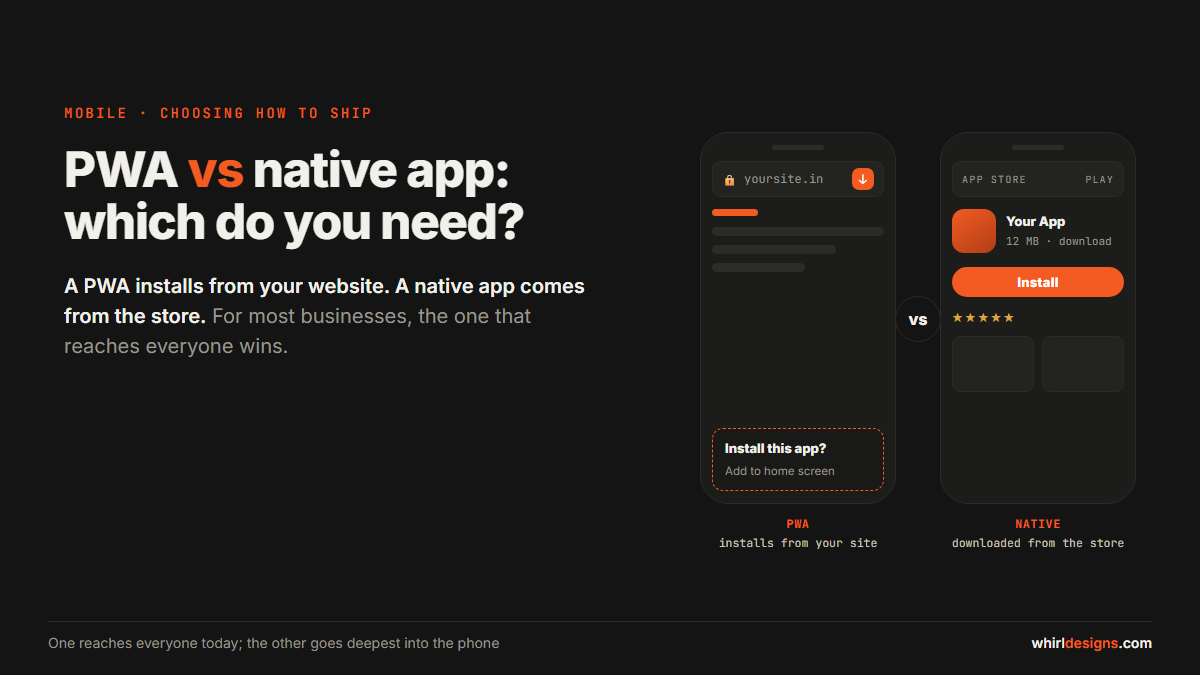
PWA vs native app: before the detail, here is the honest answer. A PWA — progressive web app — is a website that installs on a phone like an app, with no app store. A native app is built for Android and iOS and downloaded from the stores. For most businesses, start with a PWA and go native only for a feature a website genuinely cannot do.
Most owners open this conversation certain they need an app in the Play Store. Sometimes they are right. More often they have been sold the store, not the software — and a website that behaves like an app would reach more customers, cost a fraction as much, and ship a fix the same afternoon instead of waiting on a review.
The wrong choice here is expensive in a way that does not show up for months. Pay to build two native apps when a PWA would have done, and you have usually spent far more than a single PWA would cost, slowed down every future change, and still reached fewer people — because a chunk of your customers will never install an app to book one appointment. So it is worth ten minutes to get this right before anyone writes code.
The quick comparison: PWA vs native app
Seven differences settle almost every case. Read them down the two columns and the shape of your decision tends to appear on its own.
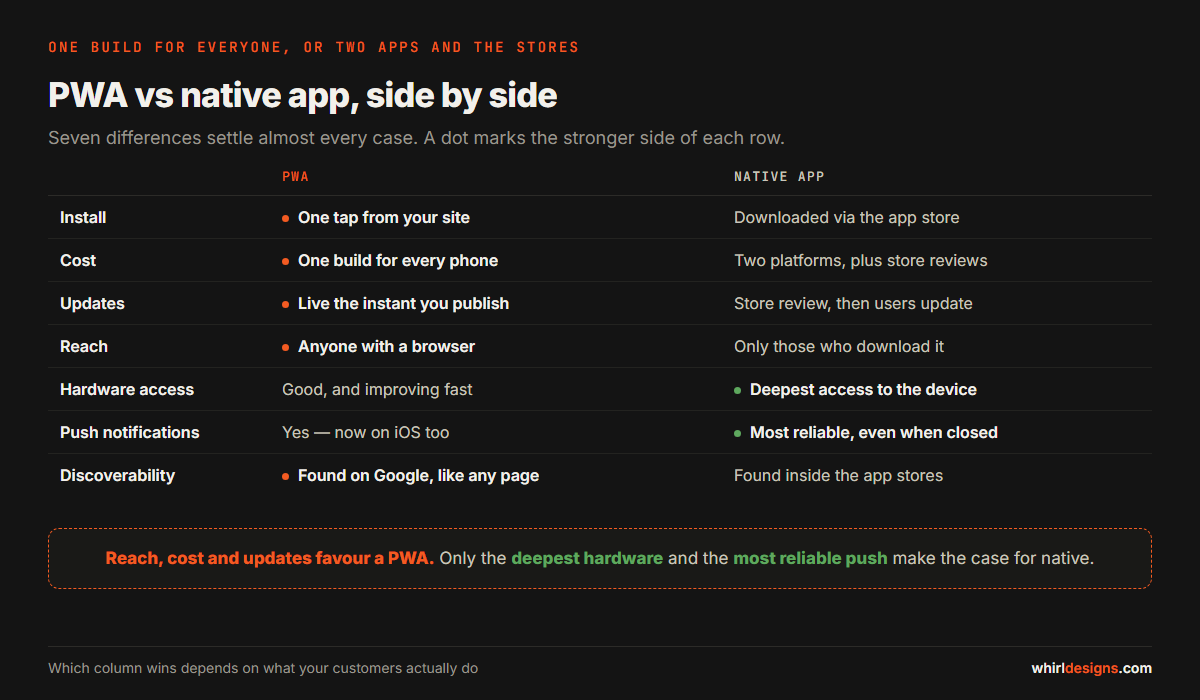
| Dimension | PWA | Native app |
|---|---|---|
| Install | One tap from your own site, no store | Downloaded from the app store |
| Cost | One build for every phone | Two platform builds, plus store accounts |
| Updates | Live the instant you publish | Store review, then users must update |
| Reach | Anyone with a browser | Only people who install it |
| Hardware access | Good, and improving fast | Deepest access to the device |
| Push notifications | Yes, now on iPhones too | Most reliable, even when the app is closed |
| Discoverability | Found on Google like any web page | Found inside the app stores |
Start with install and reach, because they are the ones owners forget. A PWA installs in one tap from your own website and works on every phone through the browser, so your whole audience can reach it today. A native app has to be downloaded from the store first, which means you only ever reach the slice of people willing to do that. Cost follows the same line: a PWA is one build for everyone, while native is two platform builds plus the store accounts and reviews that come with them. Updates are where the gap bites day to day — a PWA changes the instant you publish, where a native change waits for the store to approve it and then for each user to accept the update, so some of your customers run last month's version for weeks.
Three rows run the other way. Hardware access is the real divide: a PWA now uses the camera, location and even push notifications — yes, including on iPhones — but a native app still reaches deepest into the device and holds the most reliable notification, the one that lands when the app has been closed for days. And discoverability splits cleanly: a PWA is found on Google like any web page, while a native app is found in the app stores by people already searching there. Neither column is better everywhere. The question is which rows matter for what your customers actually do.
When a PWA is the right choice
For the large majority of businesses we build for, a PWA is the right tool — and not as a compromise. It wins on its own merits more often than owners expect.
A PWA is the right choice in four common situations.
- You want the widest reach at the lowest cost. One build works on every phone, with no second platform to fund.
- Your customers are occasional. The person who books a table once a month, orders from your kitchen on a Friday, or checks a balance now and then will not open an app store to download software for that — make them install an app and many simply won't bother. A PWA meets them in the browser they already have open.
- You change things often. A PWA updates the moment you publish — no review queue, no waiting for users to update.
- The core job is content, booking, ordering or accounts — which is what most businesses actually need.
There is one advantage owners consistently underrate. Because a PWA installs straight from your site with no store in the way, it is the right tool at the exact moment the customer most wants it — right after they have booked or ordered, while your business is still on their screen. That is when a quiet "add to home screen" prompt actually works: they just had a good experience and they are one tap from keeping it. An app store sits a decision and three screens away; your own site is already open. A clinic that lets a patient book and then pins itself to the home screen has done more for repeat visits than a native app nobody downloaded.
When you genuinely need native apps
Native is not the default, but there are real cases where it is the only sensible answer — and when you are in one, we will say so plainly.
Native is the right answer in four cases.
- Deep hardware or background work — continuous GPS that tracks a delivery rider with the screen off, heavy offline use, fine camera control, or talking to Bluetooth devices like a weighing scale, a label printer or a card machine.
- An alert that cannot be missed — the kind that must land even when the app has not been opened in a week.
- Customers who expect you in the app store, because for some audiences a store listing is itself a trust signal, and its absence reads as "not a real business."
- Performance-critical graphics — a game, a heavy live map, anything that has to stay smooth under real load.
Notice what is not on that list: "an app feels more serious," or "our competitor has one." Every item above is a specific capability a website cannot match. That is the bar native has to clear, and feelings do not clear it.
The smart middle path
The choose-one-forever framing is the real mistake. You do not decide once and live with it — you sequence it, and the sequence is cheaper and smarter than committing up front.
Launch a PWA first. Reach everyone, on every phone, for one build and a modest budget. Then watch what customers actually do — which features they use, where they drop off, what they keep asking for that a browser cannot give them. Only then, if real usage justifies it, build native apps for the specific features that earn their keep. More often than not the list turns out shorter than you feared, and now and then you find the native app was never needed at all.
Picture a restaurant doing exactly this: a PWA for customers to order and reorder, and a small native app later for the delivery riders alone — because live location with the phone in a pocket is the one job a browser cannot do well. The customers never needed the store; the riders did.
When you do go native, you rarely have to build twice over. A framework like Flutter builds both Android and iOS from a single codebase, which stops the second platform from doubling the bill. The order is the whole point: prove demand with a cheap PWA, then spend on native only where the evidence — not the fashion, not the sales pitch — tells you to.
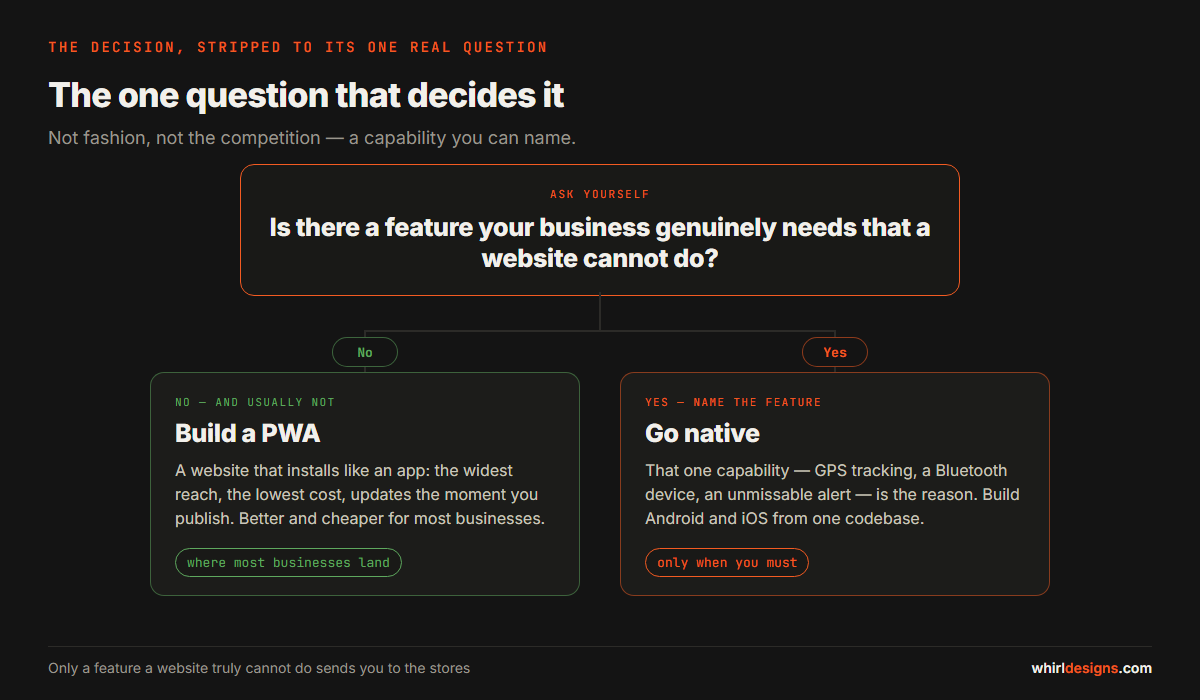
The one question that decides it
Strip away the noise and it is one question: is there a feature my business truly needs that a website cannot do?
If the answer is no — and for most businesses it is — a PWA will serve your customers better and cost you less, and you can stop reading comparison tables. If the answer is yes, then that specific feature, named out loud, is your reason to go native: continuous tracking, a Bluetooth scale, an unmissable alert. Not "apps are what real businesses have." Not a rival's app on someone's phone. A capability you can point at. If you are further upstream than this and unsure whether you need an app of any kind, start with deciding whether you need an app at all, then come back here once the answer is yes.
Common questions
Do PWAs work on iPhones?
Yes. A PWA installs to the iPhone home screen and runs full-screen like any app, and web push notifications now work on recent versions of iOS. The iPhone used to be the catch with PWAs — the one place support was thin — and that gap has largely closed. For most businesses it is no longer a reason to pick native.
Will a PWA show up on Google?
Yes — a PWA is a website, so Google indexes and ranks it like any other page. A native app does not surface in a normal Google search; it lives in the app stores and is found only by people already looking there. If being discovered on the open web matters to you, that gap is real.
Can I turn my existing website into a PWA?
Often, yes — if the site is well built. A modern, reasonably fast website can usually be upgraded to install, work offline for its key screens, and send push, without starting over. A dated or fragile site is a different conversation, and sometimes the honest advice is to rebuild it properly rather than bolt new features onto shaky foundations. We will tell you which one you have before you spend anything.
Is a PWA cheaper than a native app?
Usually, and clearly. One build reaches every phone instead of two separate platform builds, there are no app-store fees or review cycles to pay for, and shipping an update costs nothing. For most businesses the PWA is at once the cheaper option and the better one — a rare case where you are not trading quality for price.
We build both, which is the only reason to trust us when we say most businesses should start with a PWA. If a website can do the job, we will say so rather than sell you two apps you do not need — and when you genuinely need to be in the stores, we build there too. Have a look at our progressive web apps and our mobile app development, or the web application development that sits underneath both. Not sure which side of the line you fall on? Tell us what your customers need to do, and we will tell you straight whether that is a PWA, a native app, or the middle path between them.