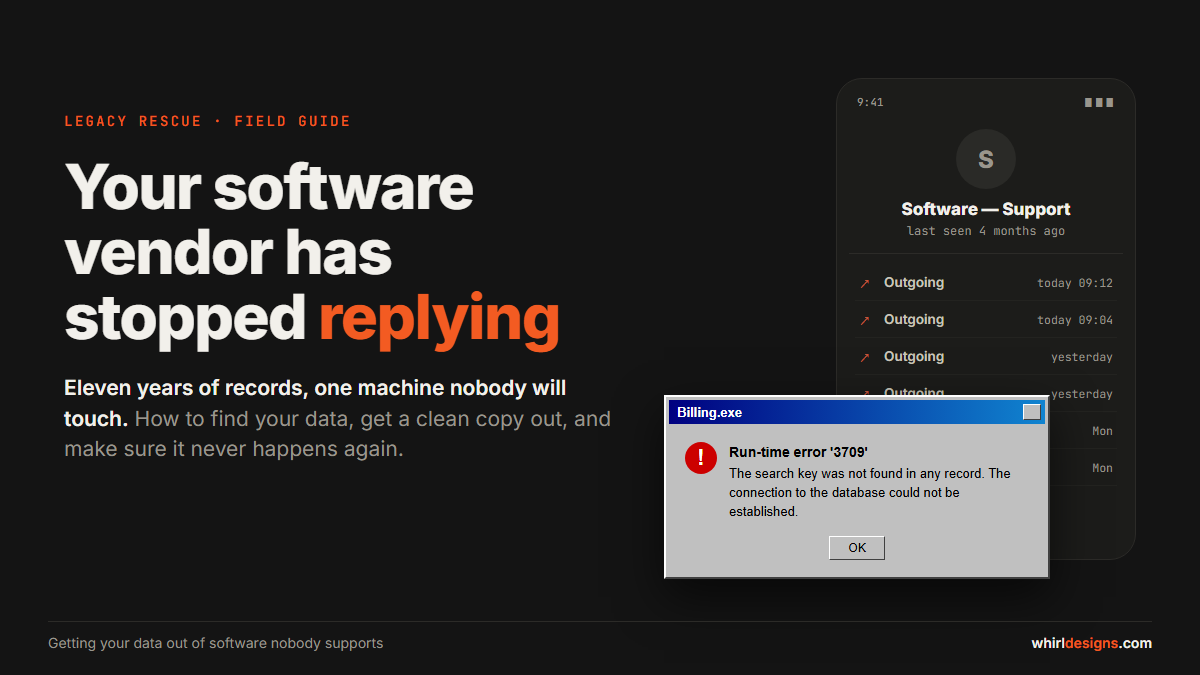
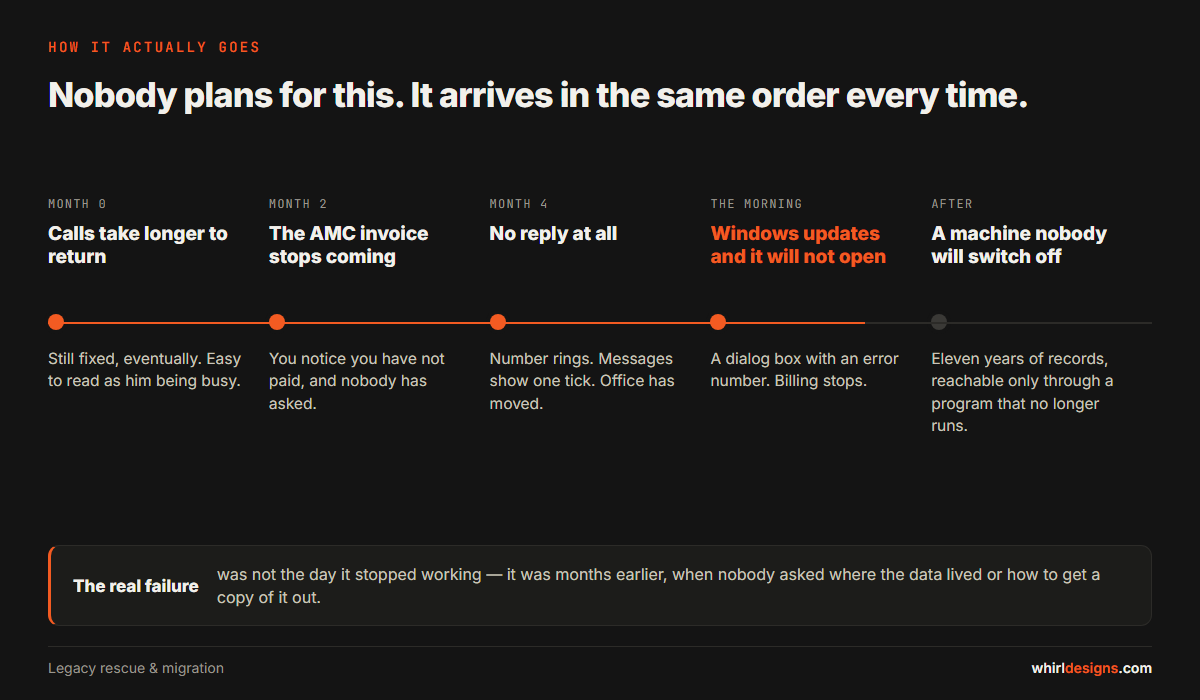
It usually starts with a phone call that is not returned. The man who built your billing software — the one who used to come down and fix things the same evening — stops picking up. Then the AMC invoice does not arrive. Then Windows updates itself one night, and in the morning the software opens to a grey box and the words Run-time error '3709'.
Now you have a problem that is not really a software problem. Eleven years of customers, stock, purchase history and outstanding balances are sitting inside a program nobody will touch, on a computer you are now afraid to switch off.
We see this often enough across Udupi, Mangaluru and the towns between them that it has a shape. This article is the shape, and what to do at each point of it. It is written for the owner, not for a developer — you do not need to understand databases to follow it.
First, stop and do nothing for an hour
The instinct is to call someone immediately and ask them to "fix it". Resist it for one hour, because the two worst outcomes both come from acting fast:
- Somebody reinstalls Windows to "clean it up", and the data folder goes with it.
- Somebody installs new software on the same machine and overwrites a shared component the old program depended on.
Before anything else, make a copy of the whole machine or at least the whole program folder onto an external drive. Not a copy of what you think is the data — a copy of everything. The data file is often not where you would guess, and you will not get a second chance.
The three questions that decide everything
Whether this costs you a week or six months comes down to three answers.
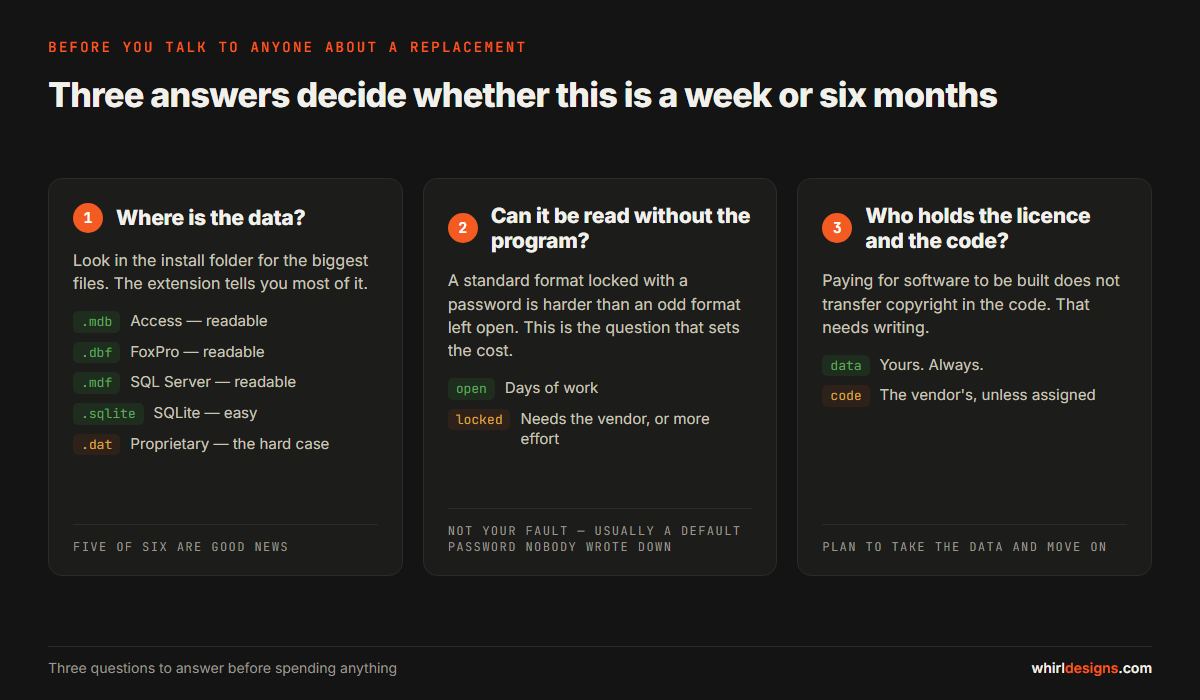
1. Where is the data?
Business software written for Indian small businesses over the last twenty years stores its data in a fairly small number of places. You can usually tell by looking in the installation folder — normally under C:\Program Files, C:\ or a folder named after the vendor — and looking at the biggest files.
- .mdb or .accdb — Microsoft Access. Very common in software from the 2000s. Easy to read.
- .dbf — FoxPro or dBase. Common in older billing and inventory packages. Easy to read.
- .mdf and .ldf — Microsoft SQL Server. The data is not in the folder; it is inside a service running on the machine. Readable, but needs the server password.
- .frm, .ibd or a
datafolder under a MySQL install — MySQL. Readable. - .sqlite or .db — SQLite. Very easy to read.
- .dat, .idx or an extension nobody recognises — a proprietary or encrypted format. This is the hard case.
Five of those six are good news. Even the proprietary case is rarely hopeless, but it changes the method and the cost.
2. Can the data be read without the program?
This is the question that actually matters, and it is different from the first one. A standard database format that has been password-protected by the vendor is harder than an unusual format left open.
Being locked out of your own data is not unusual and it is not your fault. It was often not even deliberate — a default password nobody wrote down, set by a developer who assumed he would always be the one opening it.
3. Who holds the licence, and who holds the code?
This is where owners are usually surprised, so it deserves its own section.
What you own, and what you probably do not
In most small software deals in India there is no written contract at all — there is a quotation, some payments, and a working relationship. When that relationship ends, the default position under copyright law is uncomfortable:
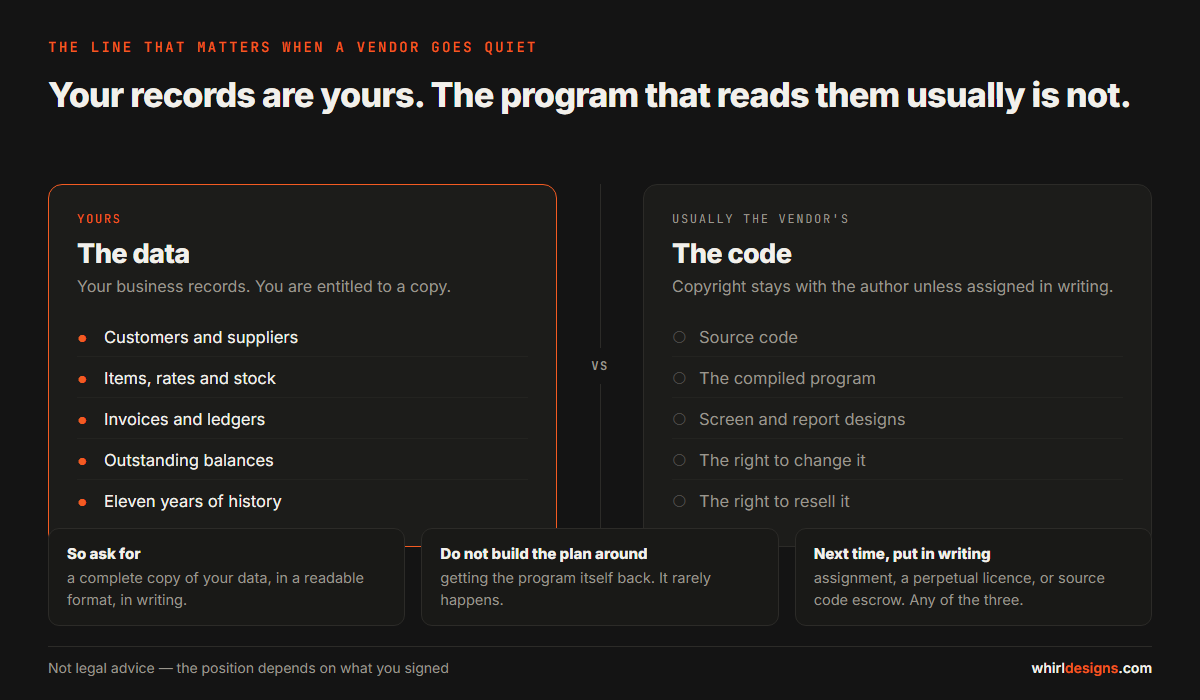
Your data is yours. Customer names, invoices, stock movements, ledgers — these are your business records. Nobody has a serious claim to them, and you are entitled to a copy. If the vendor is reachable but unwilling, a written request for a copy of your own data in a readable format is a reasonable and normal thing to send.
The source code is usually the vendor's, unless your agreement says otherwise in writing. Paying for software to be built does not automatically transfer copyright in the code — in India, as in most places, the author holds it unless it is assigned in writing. This surprises people who have paid several lakh over the years. It is why an assignment clause or a source code escrow arrangement matters, and why we will come back to it at the end.
The practical consequence: plan on getting your data out and moving on. Do not build your plan around getting the program back.
Getting a clean copy out
There are four routes, in order of preference.
Route 1: the vendor's own backup feature
Almost every such program has a Backup option buried in a Tools or Utilities menu. Use it. The file it produces is usually the complete database and is the single most valuable thing you can walk away with. Take one, copy it to two different places, and keep one off the premises.
Route 2: the export screens
Most of these programs can export a report to Excel or CSV. It is tedious — you may be exporting masters and twelve months of transactions screen by screen — but it needs no technical help and it produces something any new system can read.
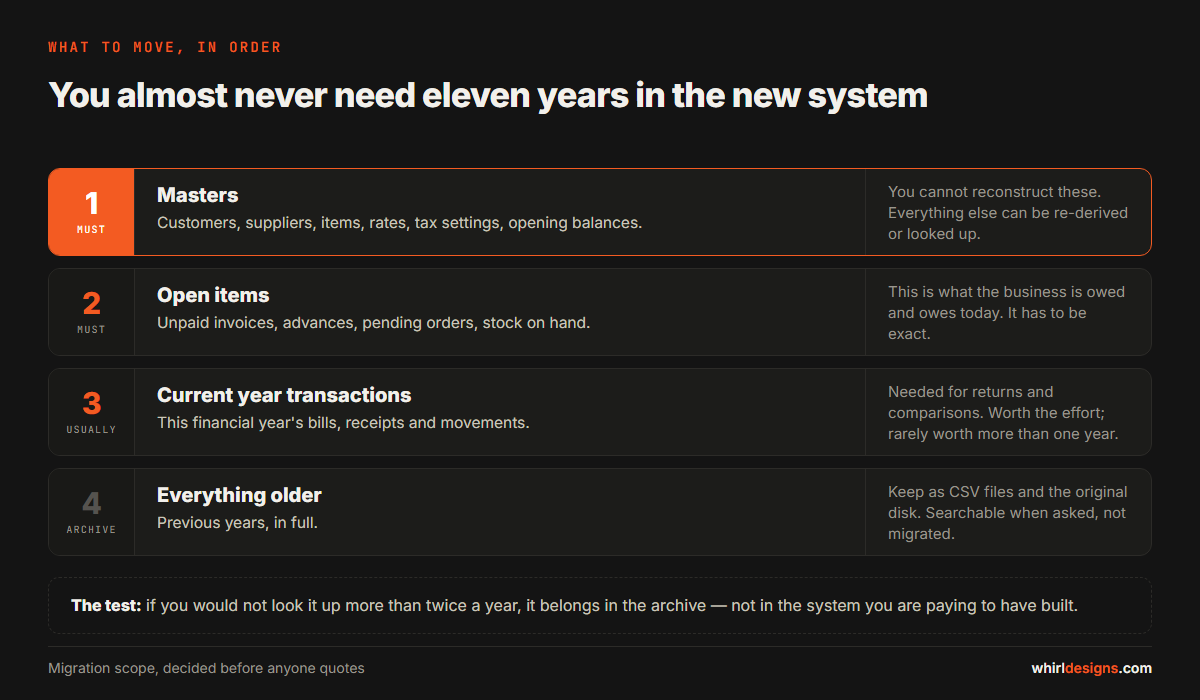
Export the masters first: customers, suppliers, items, opening balances. Those are the records you cannot reconstruct. Transactions can often be summarised instead of migrated in full.
Route 3: reading the database directly
This is the normal professional route and it is less dramatic than it sounds. A developer connects to the file or the database service, reads the tables, works out what the columns mean, and writes out clean CSVs. For Access, FoxPro, SQLite, MySQL and SQL Server this is routine work, measured in days rather than weeks.
The real work is not the extraction — it is understanding a schema written by somebody who never expected anyone else to read it. Tables named TBL1, a column called FLAG3 that turns out to mean "cancelled", dates stored as text in three different formats. That interpretation is most of the effort, and it is why "just export the data" quotes vary so widely.
Route 4: screen scraping and PDFs
When the format is genuinely closed, the last resort is to drive the old program and capture what it prints. It is slow and partial, and you should treat it as a way to preserve history for reference rather than to migrate a working system. If you are here, plan on rebuilding masters by hand and keeping the old machine as an archive.
Do not switch the old system off
The most common expensive mistake is cutting over in one weekend because the new system "looks ready".
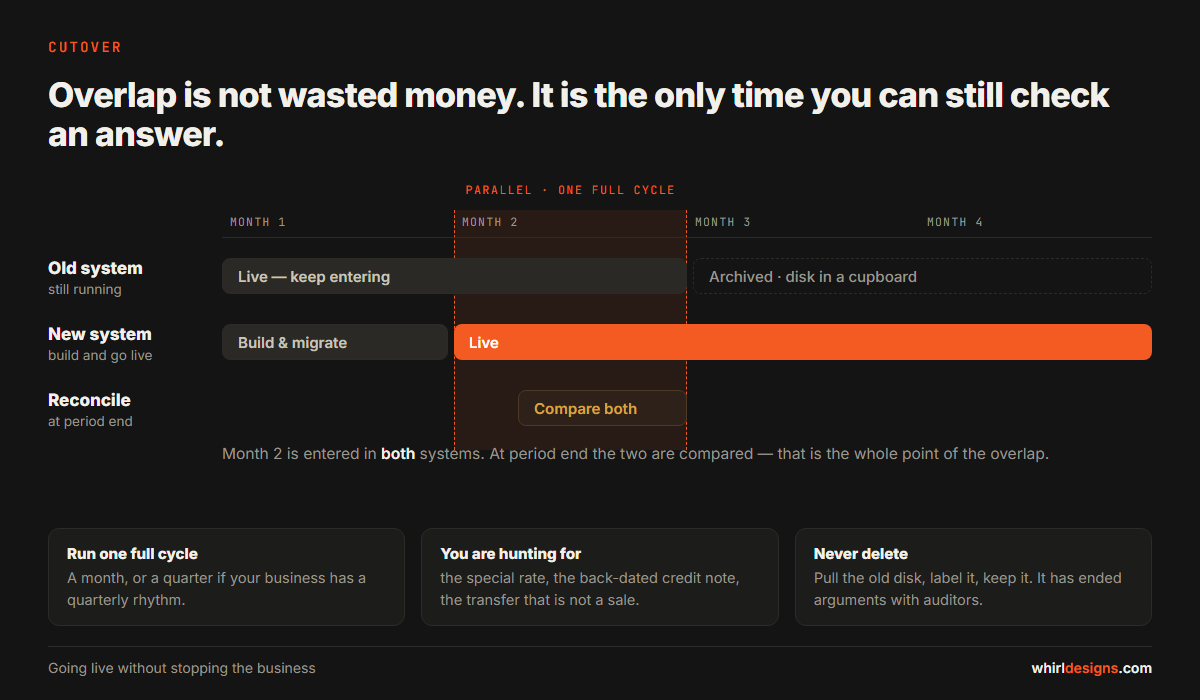
Run both for a full cycle — a month, or a quarter if your business has a quarterly rhythm. Enter into the new system, keep the old one reachable, and reconcile at the end of the period. You are looking for the things nobody mentioned during requirements: the one customer who gets a special rate, the credit note that must carry the original invoice date, the godown transfer that is not a sale.
Keep the old machine. Take its hard disk out at the end, label it, and put it in a cupboard. It costs nothing and it has ended more than one argument with an auditor.
Building the replacement so this cannot happen again
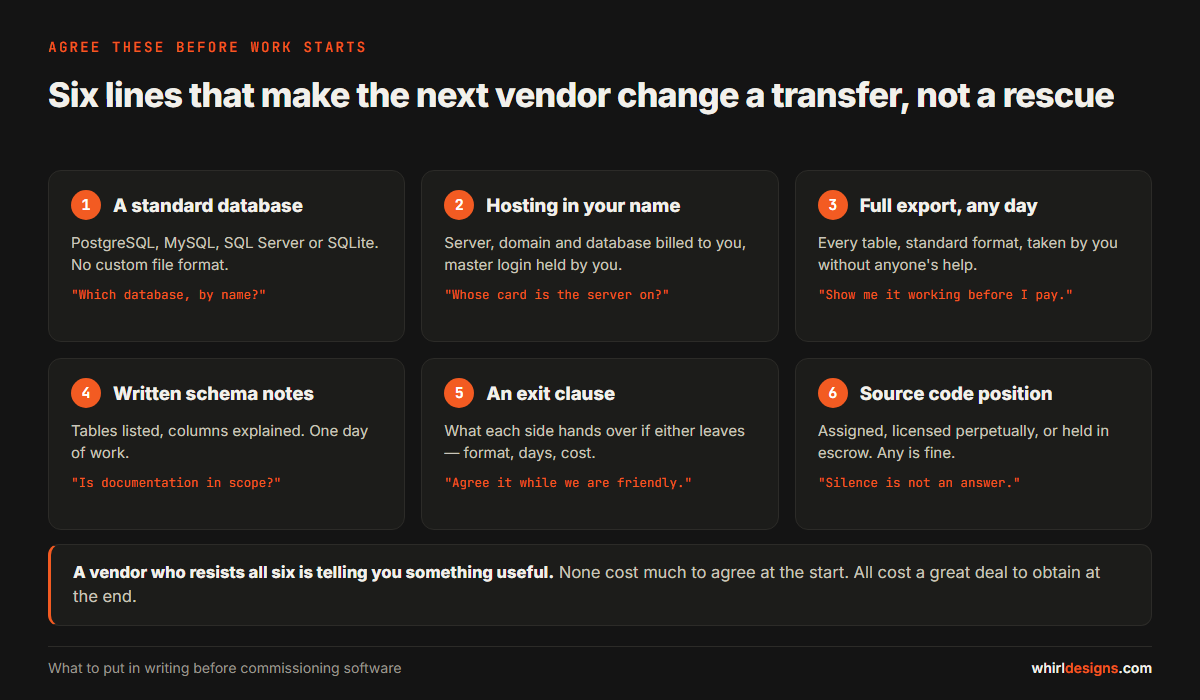
The point of the exercise is not to move from one dependency to another. Whoever builds your next system — us or anyone else — should agree to these in writing before work starts. None of them are unusual requests, and a vendor who resists all of them is telling you something useful.
- A standard database. PostgreSQL, MySQL, SQL Server, SQLite. No custom file format. This single point removes most of the risk described above.
- Hosting in your name. The server account, the domain and the database should be billed to you, with you holding the master login. Your vendor can have working access. There is a difference.
- A full export, any day you ask. Not a report — a complete dump of every table in a standard format, which you can take without anyone's help. Ask to be shown it working before the final payment.
- Written schema documentation. A list of tables and what each column means. It is a day of work and it is the difference between a two-day migration and a two-month one.
- An exit clause. What happens if either side walks away: the data handed over in a stated format within a stated number of days, and what it costs. Agree it while everyone is friendly.
- Source code position stated in writing — either assigned to you, licensed to you perpetually, or placed in escrow. Any of the three is fine. Silence is not.
What this usually costs
We are deliberately not putting a number on the rescue itself, because the range is genuinely wide and depends almost entirely on question two above. A readable Access or SQLite database with sensible table names can be extracted and cleaned in a few days. An encrypted proprietary format with eleven years of history and no documentation is a different project.
What we can say is that the extraction is normally the small part. The larger cost is the replacement system, and that is a decision about what the business needs now — not about what the old software did in 2014. We wrote separately about what custom software actually costs in India, which is the better place to start on budget.
One more thing worth saying plainly: if your current software still works and the vendor is merely slow, you are not in an emergency. Take a backup, get the export question answered, and plan the move calmly over a few months. The businesses that get hurt are the ones that discover all of this on the morning the program stops opening.
If you are in the middle of this now
The order is: copy everything, find the data, answer the three questions, get an export, run parallel, then archive. Nothing in that list requires you to be technical, and the first step is the one that protects you most.
We do this work as legacy rescue and migration — reading an old database, getting your records out cleanly, and building the replacement as a web application or a custom system that runs on your own server, with your own export button. If you want a second opinion on what you are sitting on, send us the folder listing and the file extensions and we will tell you which of the six cases you are in, free.