Two pitches are doing the rounds. One says a website is now a weekend job, because AI writes the code. The other says use WordPress, because 43% of the web does and it cannot be wrong.
Both are sales pitches. We are in a position to check them, because we run both kinds of site on the same server: one hosting account, 19 live sites, 13 of them WordPress and 6 written by hand. Same machine, same PHP version, same network, same people responsible when something breaks.
So we counted.
How much code is actually there
The first question worth asking about any website is not how fast it is. It is how much code exists that somebody has to keep safe.
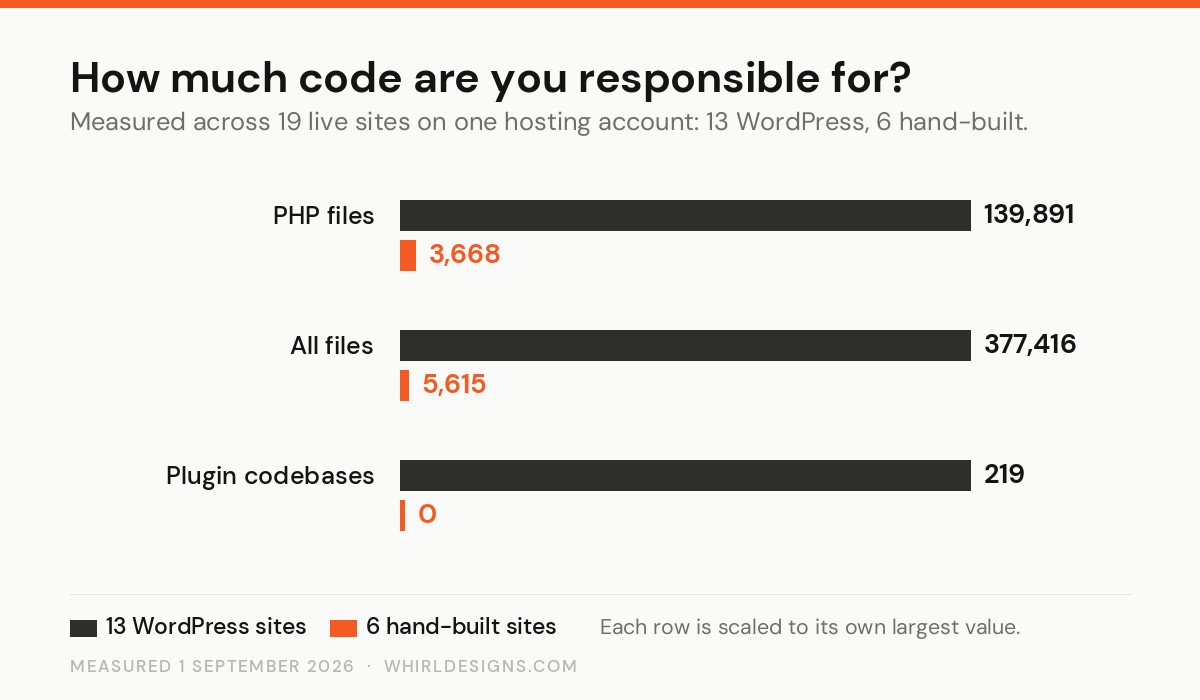
The 13 WordPress sites hold 139,891 PHP files. The 6 hand-built ones hold 3,668. That is 38 times more executable code to serve a set of sites doing broadly similar jobs — news, a hotel, a shop, a company brochure.
The number that matters more is the last row. Those WordPress sites run 219 separate plugin codebases between them, an average of 16.8 per site. Every one is software written by somebody else, installed with full database access, and updated on their schedule rather than yours.
The caveat that weakens our own headline
On disk the gap looks even wider: 31 GB of WordPress against 485 MB of hand-built. We are not going to use that figure, because it is not honest. 41% of that 31 GB is uploaded photographs — these are news sites with years of archives, and a hand-built brochure site has nothing comparable. Media is content, not code, and content is not the platform's fault.
Strip the uploads out and the plugins themselves come to 2,111 MB, the themes 267 MB. The file counts above are the fair comparison. The disk total is not.
About that 43%
The most common argument for WordPress is its share of the web, so it is worth being precise about the number. Measurements through 2026 put WordPress at roughly 41–43% of all websites, and about 59% of every site running a recognised CMS — more than all its competitors combined. It also appears to have peaked: the high point was around 43.6% in early 2025, and it has drifted down slightly since.
That is a genuinely enormous number and it buys you real things. Documentation for every problem you will ever have. A large pool of people who can take over. Plugins for tasks nobody has bothered to write twice.
What it does not buy is safety or speed, and this is where the argument gets misused. Popularity is not a quality measure — it is also precisely why WordPress is the most heavily scanned software on the internet. The same ubiquity that makes it easy to hire for makes it worth an attacker's time to automate. Both facts come from the same statistic.
Where WordPress risk really comes from
WordPress core is well-audited software maintained by people who take it seriously. That is not where sites get broken into.
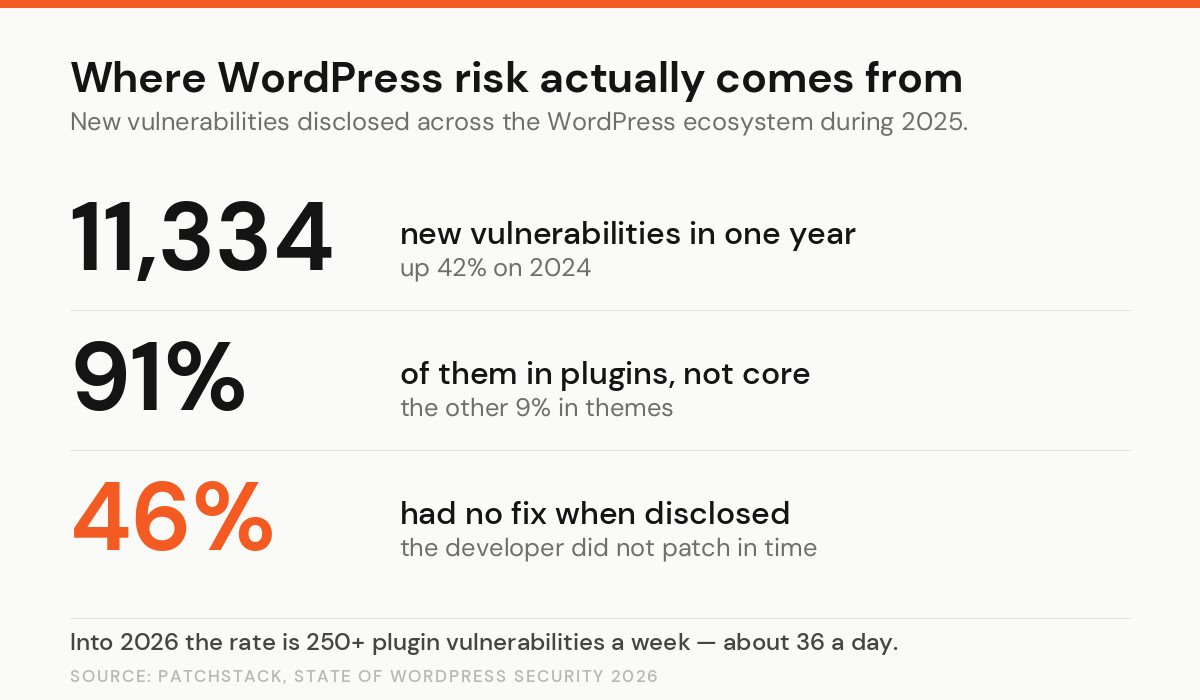
Patchstack recorded 11,334 new vulnerabilities in the WordPress ecosystem during 2025, up 42% on the year before. 91% of them were in plugins, not in core. And 46% had no fix from the developer at the moment they were made public — meaning that for nearly half, the responsible thing to do was disable the plugin, not update it.
Set that against our own count. A site carrying 17 plugins is carrying 17 chances a year that one of them appears on that list on a week when nobody is watching. That is not a WordPress flaw. It is arithmetic.
Speed, measured by Google rather than by a plugin
Every page-speed tool will give you a score out of 100. Google's field data is more useful, because it is what real visitors actually experienced.
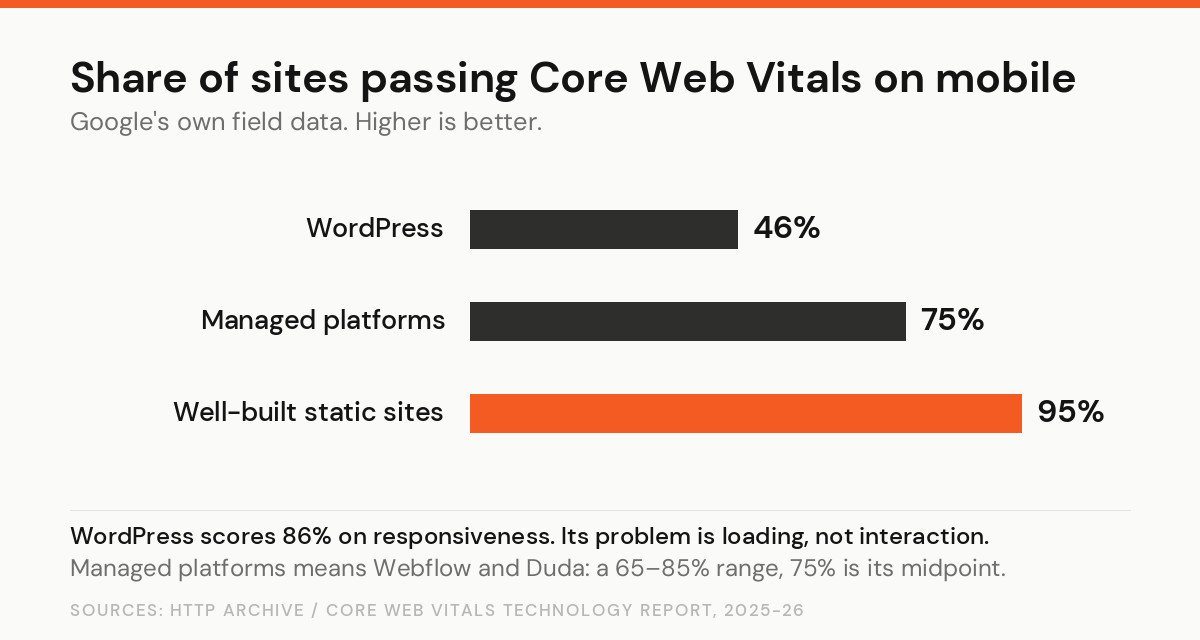
Roughly 46% of WordPress sites pass on mobile. Well-built static sites reach 95%. But read the fine print before concluding anything: WordPress scores 86% on responsiveness. Once a WordPress page has loaded it behaves perfectly well. The problem is the loading, and the loading is mostly a hosting and plugin problem rather than a WordPress one. Move the same site to better hosting with proper caching and the number moves a long way.
Now the other pitch
So build it instead, with AI, and skip the plugins entirely. This is where the second sales pitch needs the same treatment.
Veracode's 2026 report tested more than 100 AI models across four rounds on standard coding tasks. The models produced code that compiled almost 100% of the time. On security they scored 56% — meaning roughly 44% of tasks produced code with a detectable OWASP Top 10 vulnerability. SQL injection, cross-site scripting and log injection were the usual offenders. That number has barely moved in a year, across four snapshots, while the models themselves got substantially better at everything else.
Read those two figures together, because together they are the whole problem. Nearly 100% syntax success. 56% security success. AI-generated code works. It runs, it looks finished, it does what you asked. Nothing warns you about the other 44%, because there is nothing to see. A missing plugin update at least shows up on a dashboard.
An AI-built site is not automatically safer than WordPress. It has simply moved the risk from software you did not write to software nobody reviewed.
What actually went wrong on our own server
Here is the part that decided this article.
While counting files for these charts, we noticed one site measuring 9.6 GB when only 974 MB of it was photographs and 275 MB was plugins. We went looking for the missing 8 GB.
It was a complete zip of the site sitting in the public web folder, downloadable by anyone who typed the filename. Next to it, 3.4 GB of database backups from a migration plugin, also reachable. Checking the rest of the account turned up the same thing on five more sites: about 11 GB of full site and database archives, publicly downloadable. A database backup contains the users table — every login, every password hash, every email address.
Nobody was attacked. But the door had been open for an unknown length of time, and wp-content.zip is one of the first filenames an automated scanner tries.
Note what caused it. Not WordPress. Not AI. Not a plugin vulnerability, not a bad framework choice. Somebody made a backup during a migration, left it where the web server could see it, and moved on — and after that, nobody was looking. Every archive is now moved out of the web root and blocked by rule across all 19 sites.
This is the same conclusion we reached when every one of our 306 newsletter subscribers turned out to be a bot. The platform was not the problem. The absence of anyone checking was.
Year three is where sites die
Almost every comparison you will read is about building a website. Almost every failure we are called about is three years later.
The measurements make the shape of it clear. The largest site on our account carries 34 plugins and 18,233 PHP files by itself. Nobody chose that on launch day. It accumulated: a plugin for a contact form, another for caching, another for a slider somebody wanted in 2023, each one adding code, database tables and a further thing to update.
The error logs tell the same story from the other end. One site's log holds 1,067 recorded errors; another accumulated 2,111 before it was rotated away. Those are not crashes that took a site down — they are the quieter kind, the ones that fill a log for months while the site appears to work and nobody reads the file.
A hand-built site is not immune to neglect, and it has a different weakness: fewer people can pick it up. But it does not grow on its own. Ours has the code we put in it and nothing else, which means the list of things that can rot is a list somebody wrote down.
The honest way to compare the two is not build cost. It is cost of ownership over three years, including the hour a month somebody spends checking. Most quotes for both options quietly assume that hour is free.
When WordPress is the right answer
Genuinely often, and we build on it.
If your site is mostly words and pictures, and people who are not developers need to publish several times a week, WordPress is very hard to beat. The editor is familiar, staff turnover does not strand you, and a replacement is easy to hire. Two of our news sites publish daily and nobody has needed to call us to do it.
It also wins on the boring stuff: a decade of documentation, a plugin for nearly everything, and an exit route if you fall out with your developer. That last one has real value.
When a built site is the right answer
When the site does something rather than says something. Billing, stock, bookings, pricing rules, anything with money in it. That is when a template starts costing more than it saves, because you end up bending your business around what the plugin expects.
And when speed is commercial rather than cosmetic — a sales-driving page where a second of load time is worth real money, and 95% beats 46%.
Four questions worth more than the platform choice
If you take one thing from the numbers above, make it this: neither answer is safe by default. So ask about the things that actually predict how it ends.
- Who updates it, and how often? With a name and an interval. "It updates automatically" is not an answer when 46% of disclosed vulnerabilities have no fix to install.
- Who reviewed the code? If AI wrote it, a human must have read it. Ask which human.
- What is in your web folder that should not be? Backups, zips, database dumps, a copy of the old site. Go and look today. It took us an afternoon of counting to find 11 GB of it on our own server.
- Can you leave? Do you own the code, the domain and the hosting account, in your own name?
A well-maintained WordPress site beats a neglected custom one every time. A reviewed custom build beats a WordPress site with 30 plugins nobody has touched since launch. The platform is the smaller half of the decision, and it is the half everybody argues about.
We publish our own numbers, including the embarrassing ones, because an agency that will not audit its own estate has no business auditing yours.