If you've been told your website is "slow because of the CMS," or you've watched a marketing team wait days for a developer to move a button, you've already felt the problem a headless CMS solves. It's one of the most-searched infrastructure decisions of 2026, and for good reason: the CMS market is shifting hard toward decoupled, API-first platforms, and the sites built on them are measurably faster, safer and easier to publish to more than one channel.
This guide covers what a headless CMS actually is, how it compares to a traditional CMS like WordPress, when it's worth the switch, and what a real build looks like.
What is a headless CMS?
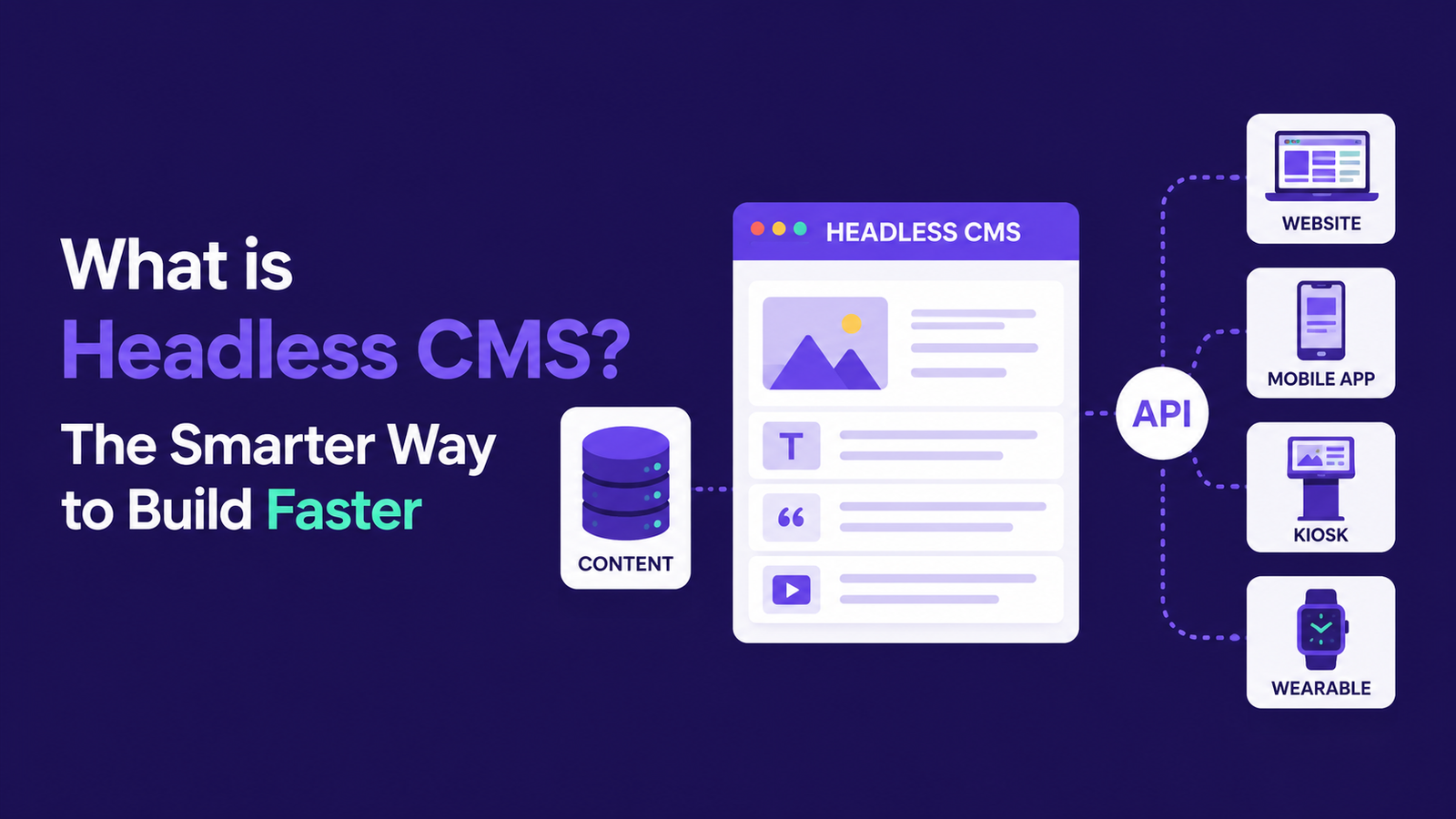
A headless CMS is a content management system that stores and manages content but has no built-in front end to display it. Instead, it delivers content through an API — usually REST or GraphQL — and a separate front end (commonly built with React or Next.js) fetches that content and renders the pages.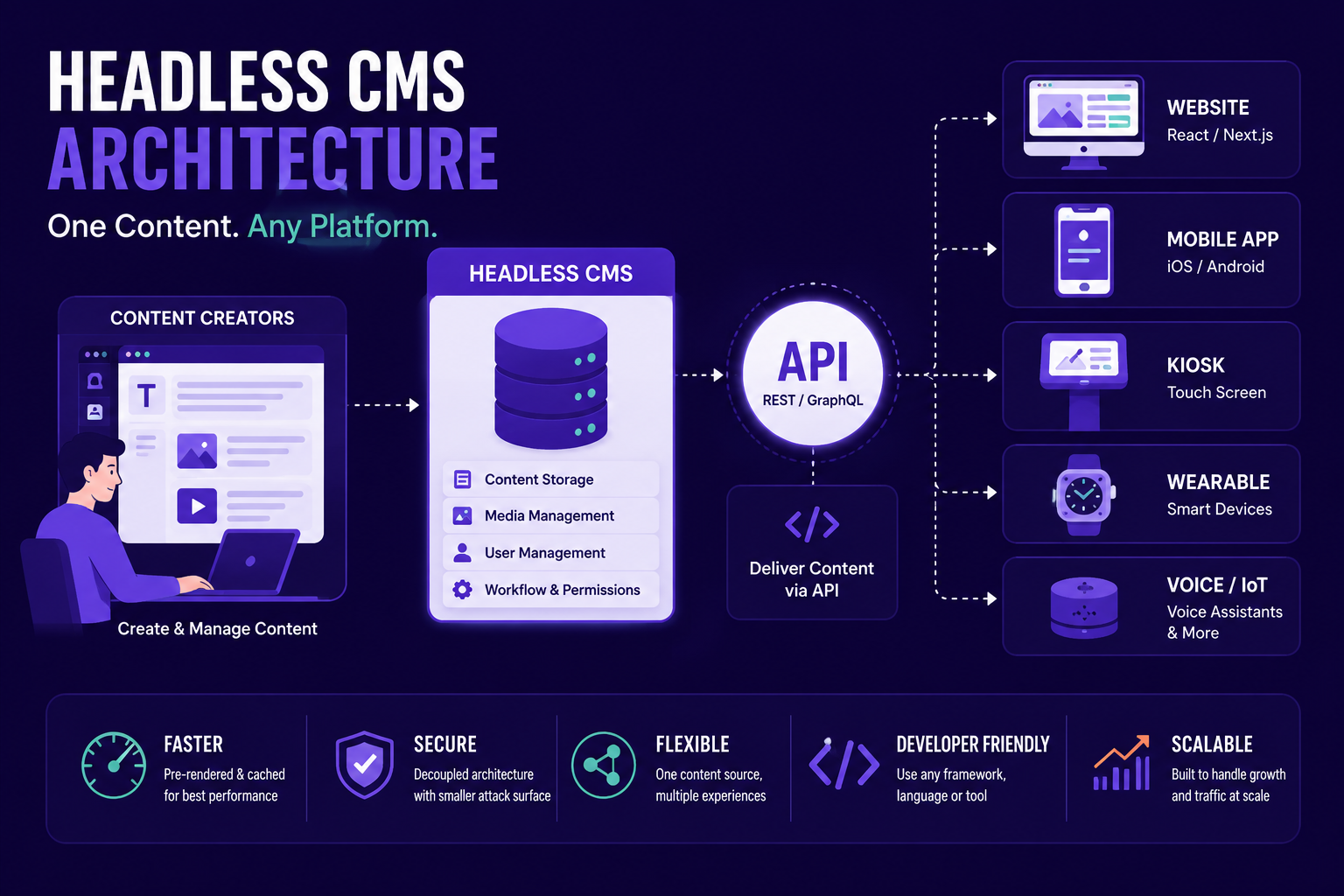
That's the entire concept: content management and content presentation are two separate systems that talk to each other over an API, instead of one monolithic platform trying to do both.
Headless CMS vs traditional CMS
A traditional CMS like classic WordPress or Wix bundles everything together: the database, the admin dashboard, and the templates that render your public pages all live in one system. Change the theme, and you're at the mercy of that theme's performance and security. A headless CMS splits those concerns apart.
| Aspect | Traditional CMS | Headless CMS |
|---|---|---|
| Front end | Built into the CMS (themes/templates) | Built separately — any framework, any device |
| Speed | Depends on theme/plugin bloat | Pre-rendered or cached — typically much faster |
| Security | Public site and admin share one attack surface | Admin is decoupled — far less to exploit publicly |
| Publishing | One website | One content source → website, app, kiosk, anywhere |
| Editor experience | Familiar, but tied to the theme | Clean dashboard, independent of the front end |
| Flexibility | Constrained by what the theme allows | Front end can be redesigned without touching content |
Why businesses are moving to headless in 2026
A few things are converging at once:
- Speed is no longer optional. Pre-rendered, cached headless front ends routinely outperform theme-driven sites, and speed affects both conversion and search rankings.
- Security matters more. With no public-facing admin panel or plugin ecosystem to exploit, a decoupled site has a dramatically smaller attack surface.
- Content needs to go everywhere. A website is often just one of several places your content needs to live — an app, a partner site, a kiosk, a voice assistant. One content source, many destinations.
- AI-era search rewards structure. Clean, well-modeled content with proper schema is exactly what both search engines and AI answer engines like ChatGPT, Perplexity and Google AI Overviews prefer to read, cite and quote.
- The tooling has matured. Platforms like Sanity, Contentful, Strapi, Storyblok and Hygraph now offer editor experiences that are as friendly as any traditional CMS dashboard, plus AI-assisted content workflows — so the old trade-off of "faster site, harder editing" has largely disappeared.
Popular headless CMS platforms
There's no single "best" headless CMS — the right one depends on your team and your stack. A quick orientation:
- Sanity — highly customizable, schema-as-code, strong for teams that want full control over the editing experience.
- Contentful — mature, enterprise-friendly, strong localization and governance tooling.
- Strapi — open-source and self-hostable, good when you want to own your infrastructure and avoid vendor lock-in.
- Storyblok — a visual, component-based editor that non-technical marketers tend to pick up fastest.
- WordPress (headless mode) — yes, WordPress itself makes a very capable headless CMS. If your team already knows the WordPress dashboard, you can keep it and put a modern, fast front end in front of it.
Is headless right for your site?
Honestly — not always. A small brochure site with five pages and no growth plans probably doesn't need this architecture; a well-built traditional site will serve it fine and cost less to set up.
Headless earns its complexity when one or more of these is true:
- Site speed and Core Web Vitals directly affect your revenue or lead flow
- You publish the same content to more than one channel (web, app, partner sites)
- You're scaling traffic or content volume and a theme-based site is starting to strain
- Security and uptime are business-critical, not just nice-to-have
- You want editorial and design/development to move independently, without one team blocking the other
How a headless build actually works
A typical stack looks like this:
- Content modeling — we define your content types (pages, posts, products, team members, whatever your business needs) inside the CMS.
- The CMS — your team writes and manages content in a dashboard (Sanity, Strapi, Contentful, or headless WordPress), with no knowledge of how it's rendered required.
- The API layer — content is exposed via REST or GraphQL.
- The front end — a React or Next.js application fetches that content and renders fast, pre-built or cached pages.
- The CDN — pages are served from edge locations close to your visitors, which is a large part of why headless sites feel instant.
Headless CMS and answer engine optimization
There's a natural pairing between going headless and getting found by AI answer engines. Because content is modeled cleanly and structured data can be generated programmatically at the API layer, it's far easier to produce the consistent schema markup, fast page loads and unambiguous content structure that AI systems favor when deciding what to cite. If ranking in ChatGPT, Perplexity and Google's AI Overviews matters to your business, a headless architecture makes that work considerably easier than retrofitting it onto a theme-based site.
How we build headless projects
We pair a headless CMS — Sanity, Strapi, Contentful or headless WordPress, depending on what fits your team — with a React or Next.js front end. In practice that gets you:
- Pre-rendered, cached pages that load almost instantly
- A much smaller security surface, since the CMS is never exposed publicly
- An editor dashboard your team actually enjoys using — we set it up and train you on it
- One content source that can power your website, app or any future channel
- A front end you can redesign or upgrade later without re-doing your content
And because we handle both the content architecture and the AEO/SEO layer on top of it, the sites we ship aren't just fast — they're built to be found and cited by both traditional search and AI answer engines.
Frequently asked questions
Is headless overkill for a small site?
Sometimes. For a simple brochure site, a traditional build is usually fine. Headless shines once speed, scale or multi-channel publishing start to matter.
Can we keep using WordPress?
Yes — WordPress makes an excellent headless CMS. Your team keeps the editor they already know, while the public site runs on a modern, fast front end.
Will our editors find it harder to use?
No. A good headless CMS is as friendly as any traditional dashboard — often friendlier, since it isn't cluttered with theme settings. We set it up and train your team as part of the build.
Is headless better for SEO?
The speed gains and clean markup genuinely help. We implement rendering (static generation or server-side rendering) so search engines and AI crawlers can index everything fully — nothing is left client-side and invisible.
How long does a headless build take?
It depends on scope, but most business sites move from content modeling to launch in a matter of weeks, not months — because the CMS and front end can be worked on in parallel once the content model is agreed.
Headless is an approach, not a product. You're not buying "headless" — you're choosing to separate your content from your presentation so each can be built well on its own terms.
If your current site is slow, hard to update, or stuck doing only one job when your content needs to reach more places, it's worth a conversation. We design and build headless and composable websites end to end — content modeling, CMS setup, front-end build and the AEO/SEO layer that makes sure it gets found. Start a project and we'll tell you honestly whether headless is the right call for your site.